Export API
The goal of the Export API is to enable our customers to securely retrieve the data that was processed using the BeWo AI spend agent. We are offering two ways in which you can retrieve your spend classified data. First, you can do it through the PowerBI template which automatically retrieves data from the BeWo Export API. Secondly, you can directly use the Spend Classified Items endpoint to retrieve and integrate the spend classified data into your existing solutions.
Since the new BeWo spend classification platform is under construction, we kindly ask you to notify the BeWo team whenever there is new data that you have uploaded to our existing platform and you want to retrieve it through the Export API.
Export API Authorization
In order to have access to the Export API, you need to ask the BeWo administrators to enable the Export API for your company's workspace.
To use the BeWo Export API you first have to get the Workspace API token which is the JWT bearer token that is going to authorize your API access. Below are the steps to obtain the Workspace API token:
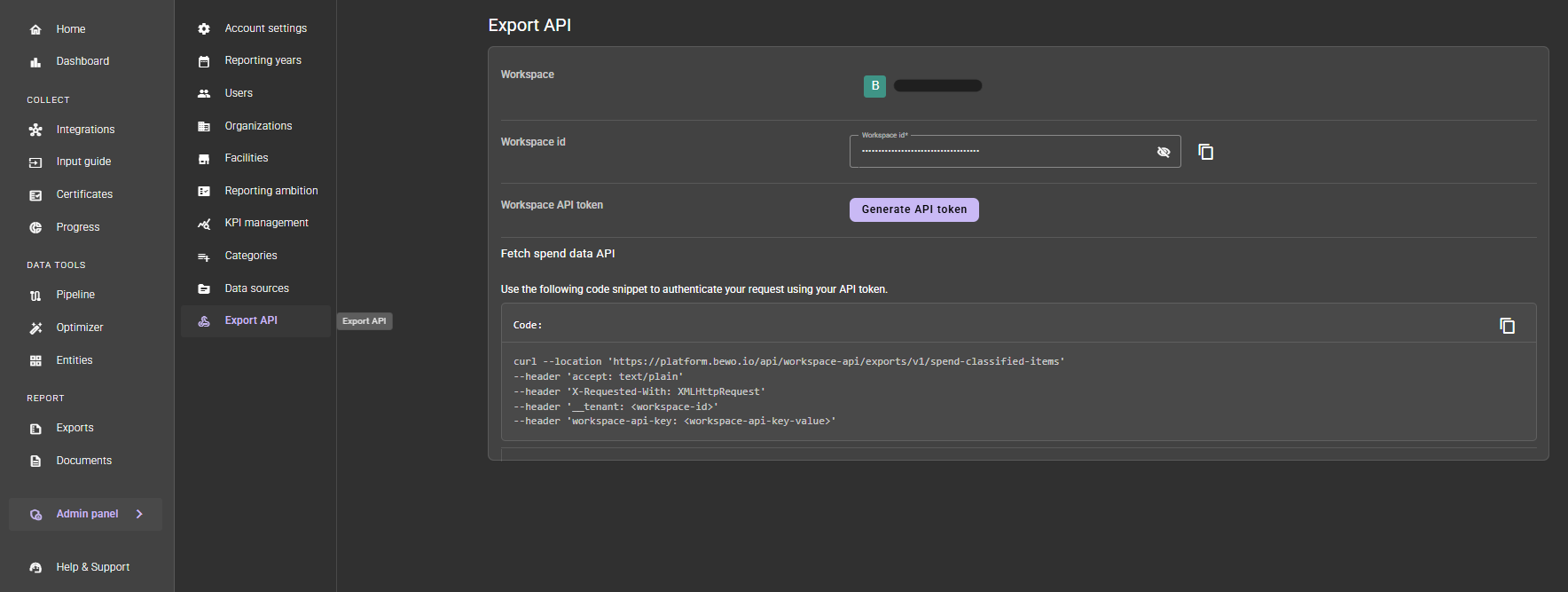
Step 1. Go to the Admin panel/Export API page and click on the Generate API token button:
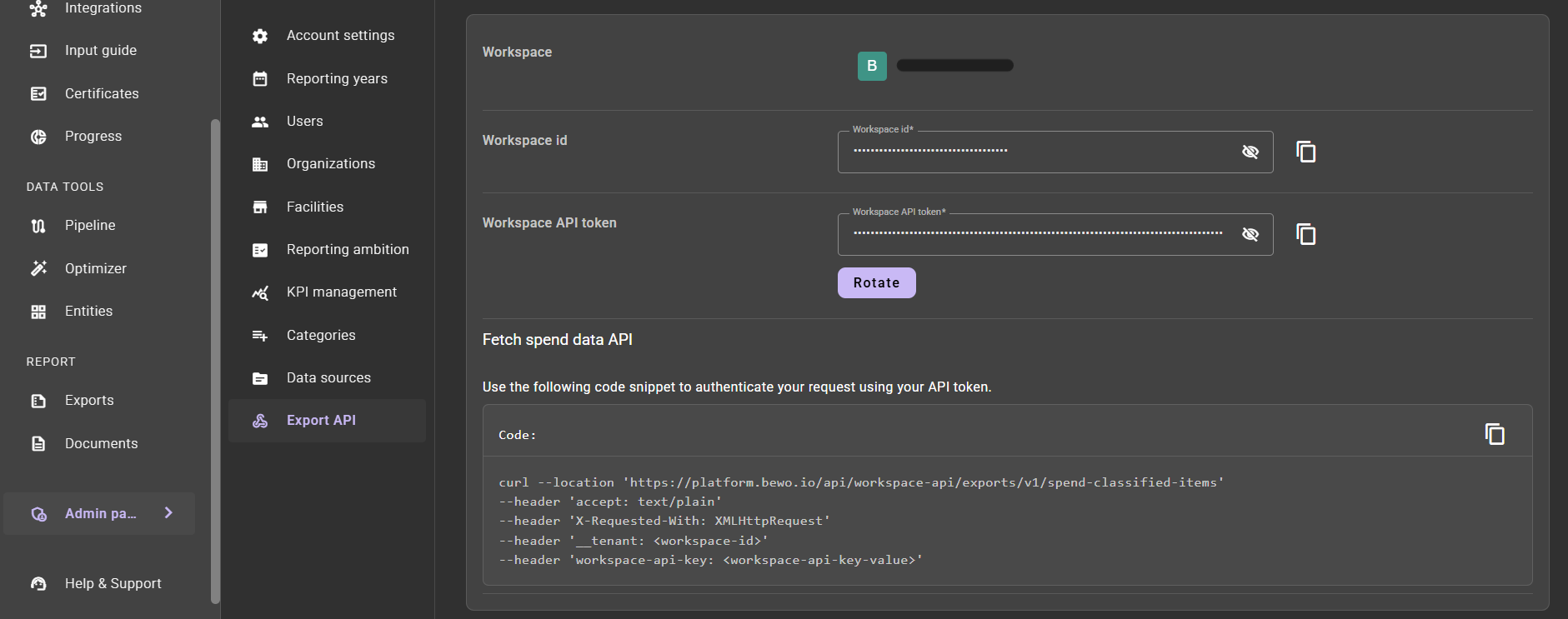
Step 2. The Workspace API token contains the JWT bearer token that you will need to use in order to authorize any API calls to the Export API. The Rotate button gives you the possibility to rotate the workspace API key.
PowerBI: Spend Classified Items
We offer a PowerBI template that is configured to take the spend classified items directly from the Export API endpoint and populate a PowerBI data table that you can use for further analysis.
The PowerBI file can be downloaded here: Spend Classified Items PowerBI
Below are the steps to work with the Spend Classified Items PowerBI file:
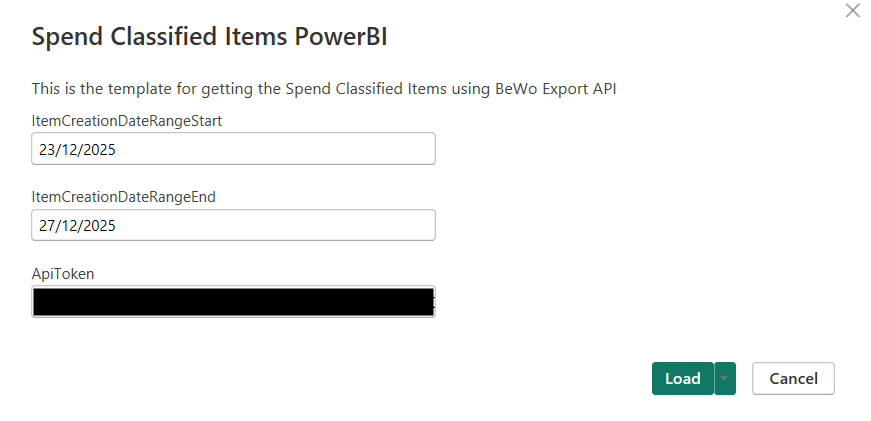
Step 1. Open the PowerBI file and set up the query fields for importing the data. The fields that you have to set up are:
- ItemCreationDateRangeStart: the starting date that you want to use for importing the items. All the displayed items in the PowerBI were created after this date
- ItemCreationDateRangeEnd: the end date that you want to use for importing the items. All the displayed items in the PowerBI were created before this date
- ApiToken: the Workspace API token that can be taken from the Export API admin page
Step 2. Go to the table view on the right navigation bar where you are going to be able to see the SpendItems table:

API Endpoint: GET Spend Classified Items
This documentation provides details for the spend-classified-items endpoint, which allows clients to retrieve the items classified by the BeWo AI Engine in a paginated format.
Endpoint Definition
- HTTP Method:
GET - URL:
https://platform.bewo.io/api/workspace-api/exports/v1/spend-classified-items - workspace-api-key:
<token_key>
Pagination Mechanisms. Cursor and Offset pagination.
The Export API supports two methods for iterating through large datasets: Cursor Pagination and Offset Pagination.
1. Cursor Pagination (Recommended)
Cursor pagination is the most efficient and reliable method for exporting large volumes of data. It avoids the performance penalties of deep offsets and ensures data consistency (no skipped or duplicate items if data is modified during the export).
How it works: Instead of counting pages, you use a pointer (rowId) to indicate the starting point for the next batch of records.
The requests flow:
-
First Request: Send a request with a defined limit (e.g., 100) and no rowId.
-
Process Response: The API returns the items and a Pagination object containing a nextRowId.
-
Subsequent Requests: To fetch the next batch, send a new request setting the rowId query parameter to the value of nextRowId received in the previous response.
-
Termination: Continue this process until nextRowId returns null, indicating there are no more items to retrieve.
2. Offset Pagination
Offset pagination is useful for retrieving specific "pages" of data or jumping to a specific point in the list (e.g., for UI tables).
How it works: It uses the offset parameter to skip a specified number of rows before returning results.
The requests flow:
- Page 1: offset=0, limit=100
- Page 2: offset=100, limit=100
- Page 3: offset=200, limit=100
Query Parameters
The endpoint accepts the following query parameters to control pagination:
| Parameter | Type | Value Example | Required | Default | Description |
|---|---|---|---|---|---|
limit | integer | 100 | Yes | - | The maximum number of items to return in the response. |
offset | integer | 5 | No | 0 | The starting position from which to return items. Used for offset pagination. |
rowId | integer | No | - | The id of the row from which the data retrieval should start. This field is used for cursor pagination. | |
createdAfter | Date Time string format | 2025-04-23T18:25:43.511Z | No | - | Used to retrieve items created after a given date/time. |
modifiedAfter | Date Time string format | 2025-04-23T18:25:43.511Z | No | - | Used to retrieve items that were modified after a given date/time. |
Testing the endpoint
The following two sections explains the necessary steps to test the GET Spend Classified Items endpoint.
1. Testing through Swagger
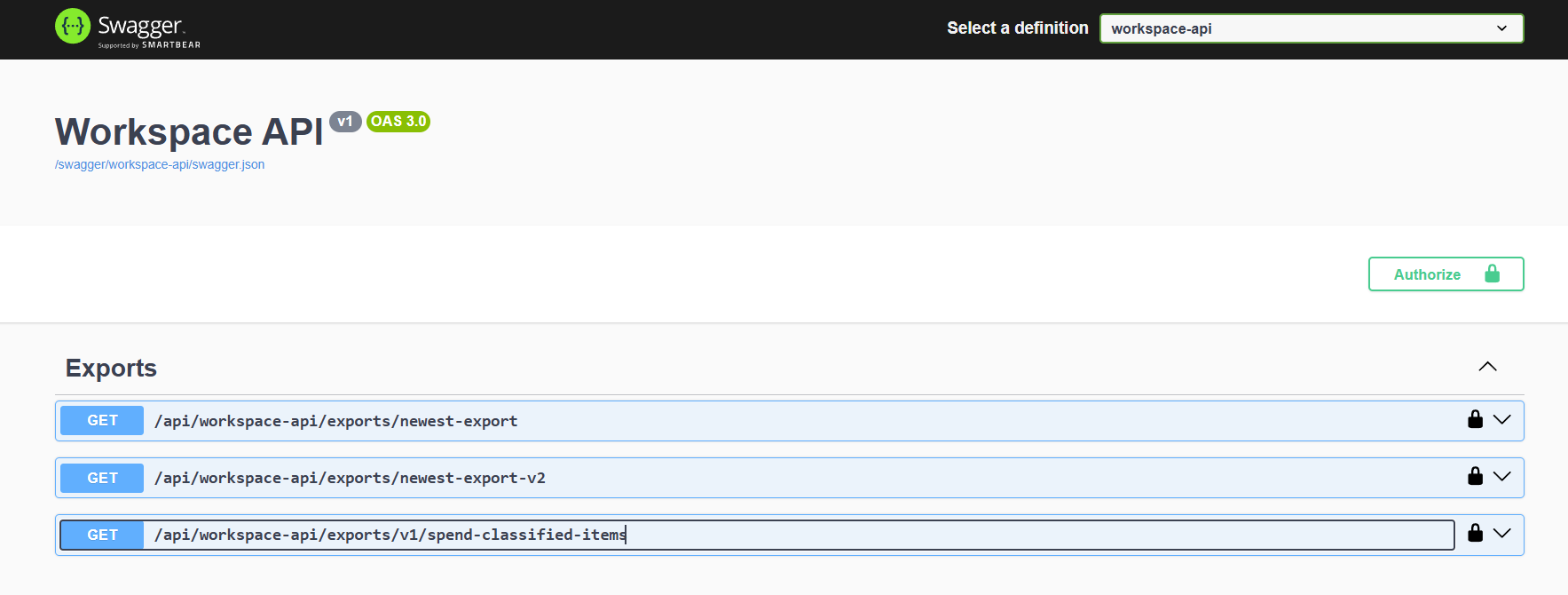
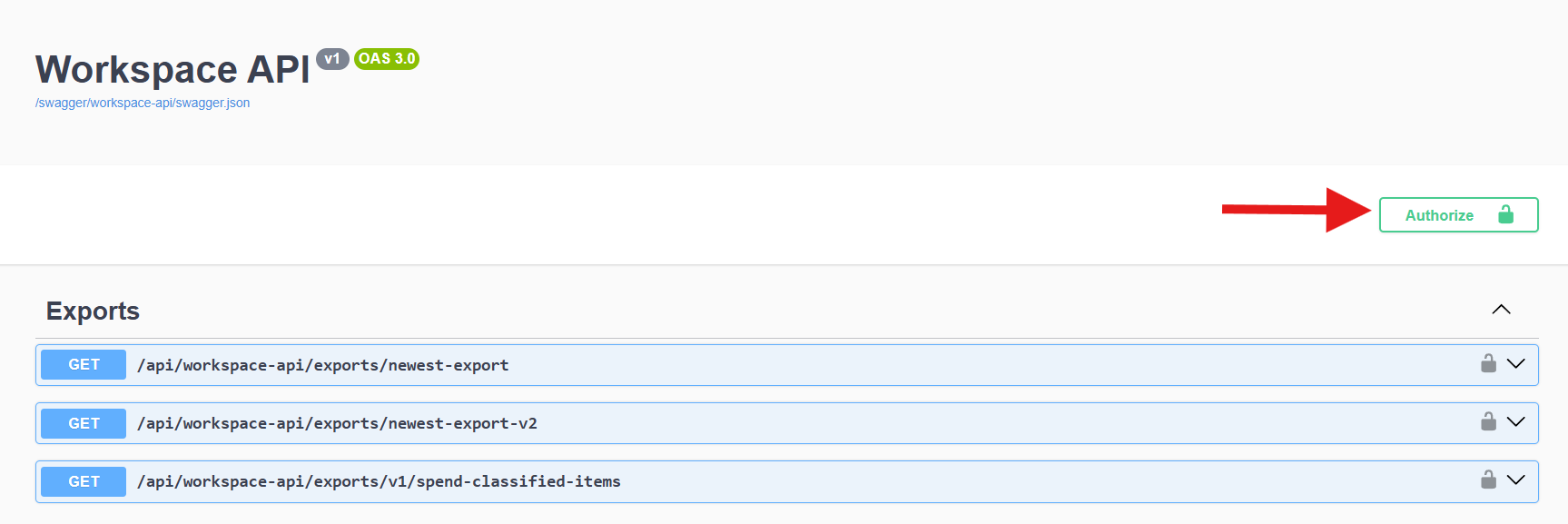
Step 1. Go to BeWo Workspace API:
Step 2. Click on the Authorize button:
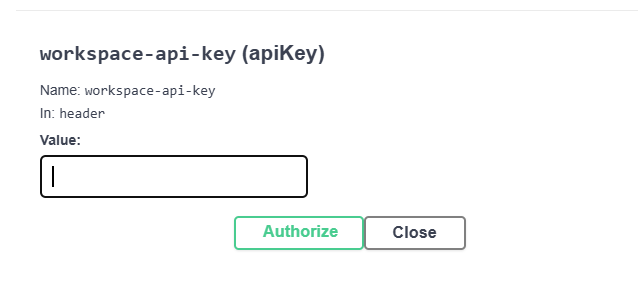
Step 3. Paste your Workspace API token in the Value cell for the 'workspace-api-key':
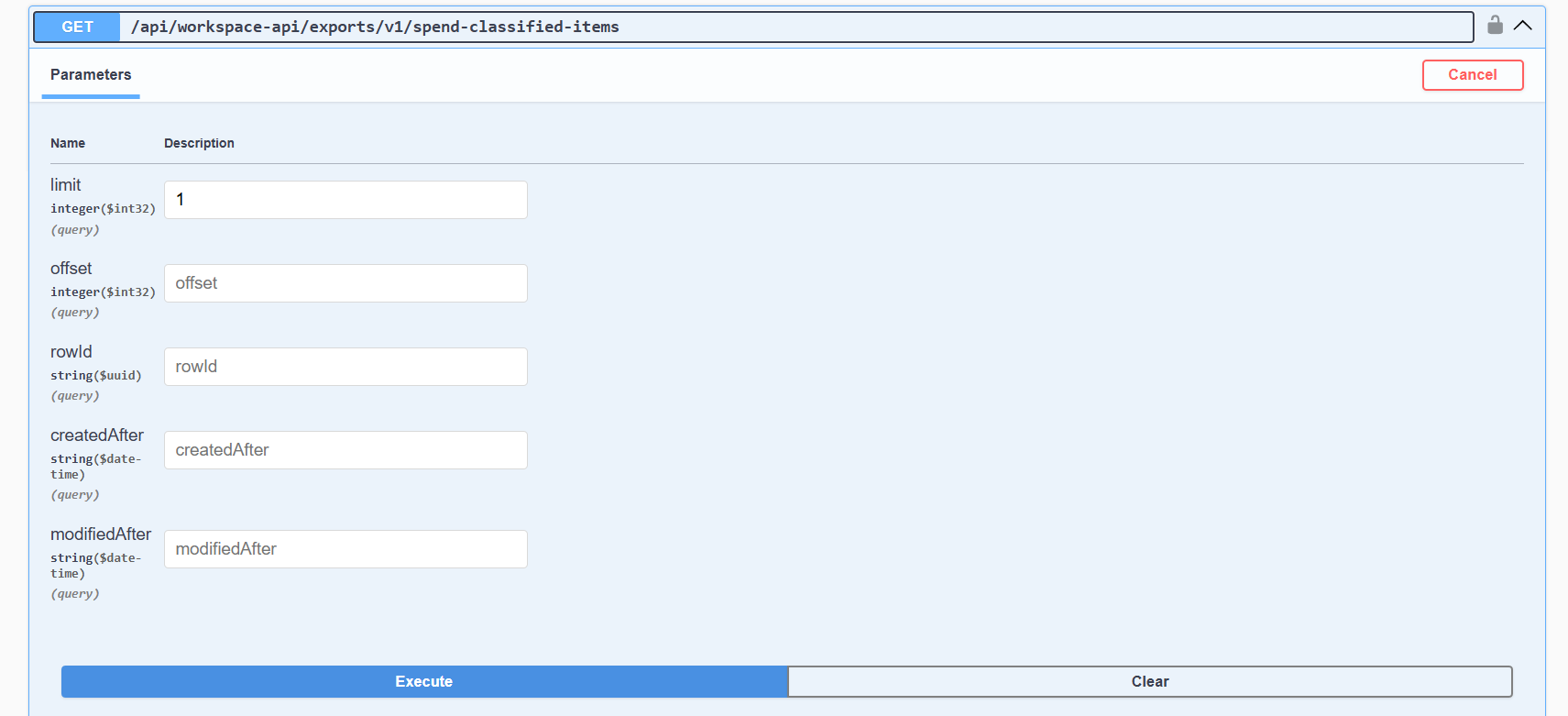
Step 4. Click on the /api/workspace-api/exports/v1/spend-classified-items in order to expand the dropdown where you can put the parameters for the spend-classified-items table. In the end, press the Execute button in order to make the API call:
2. Testing through Postman
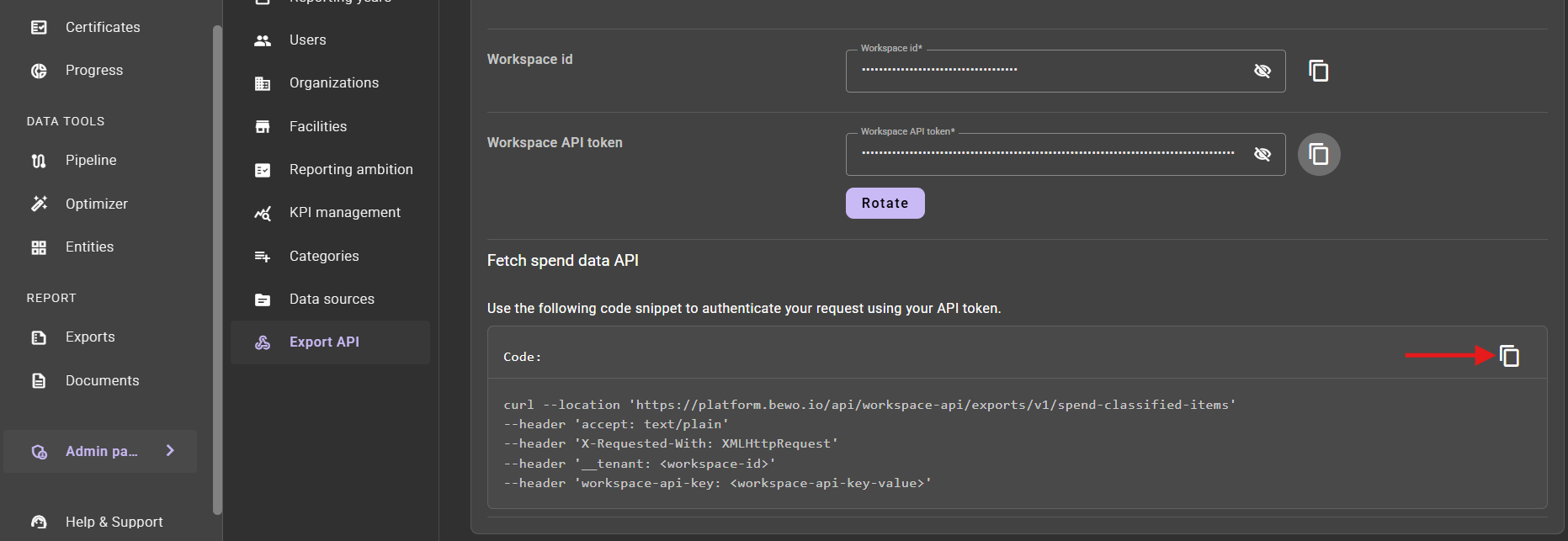
Step 1. Go to the Admin panel/Export API page and click on copy button in the top right corner of the Code panel in order to copy the curl request:
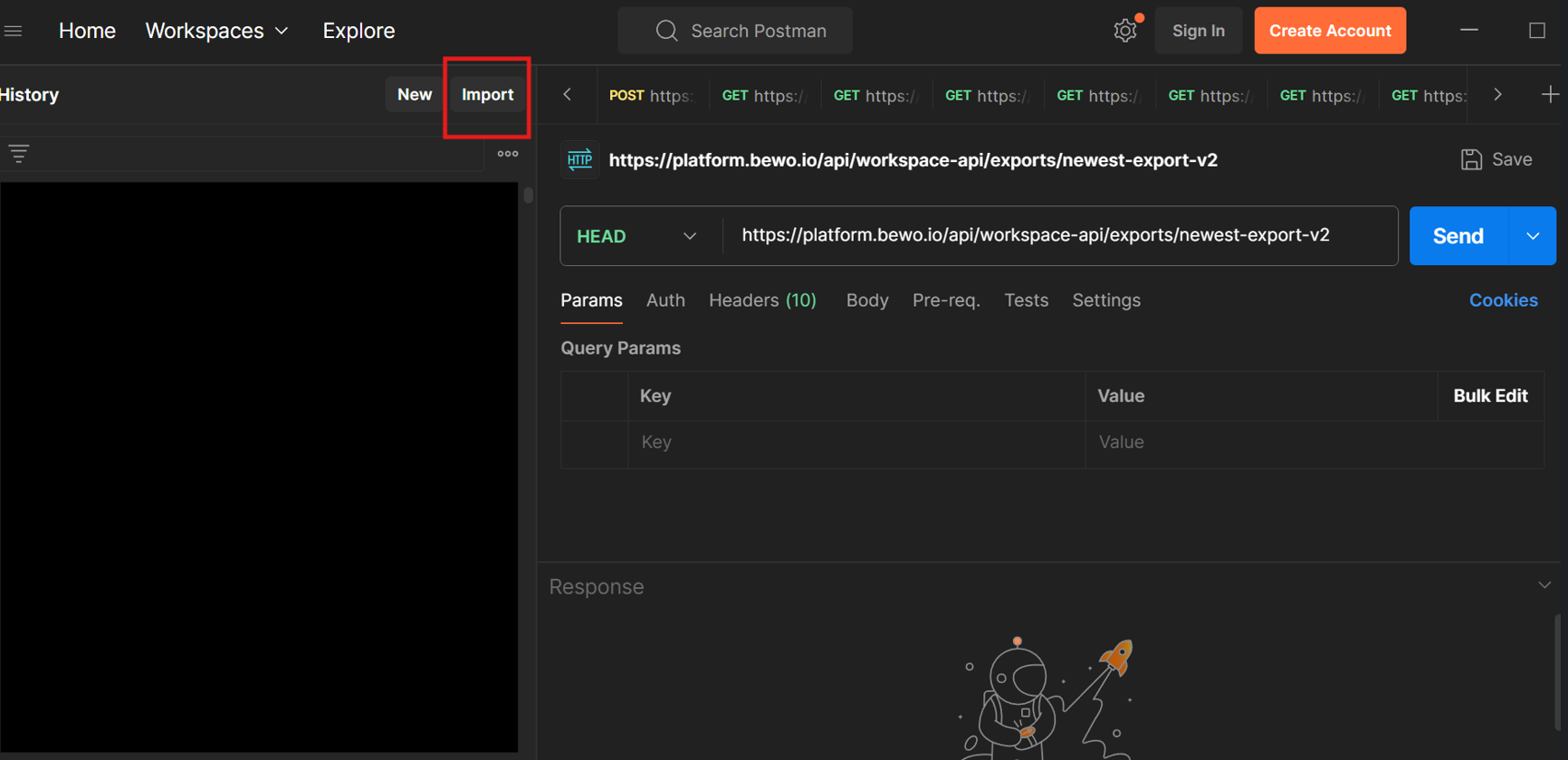
Step 2. Go to Postman and click on the Import:
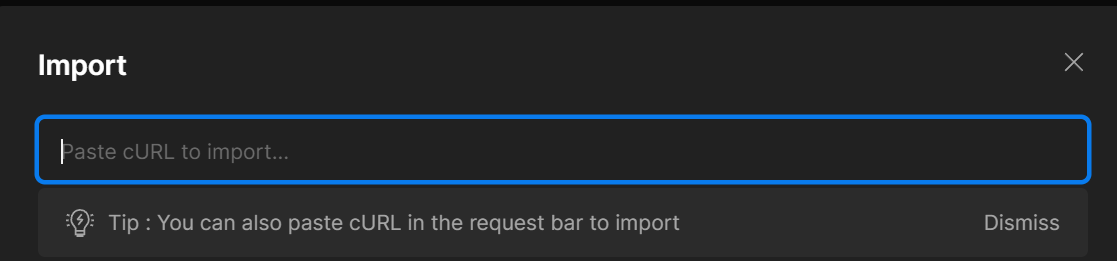
Step 3. Paste the curl requst:
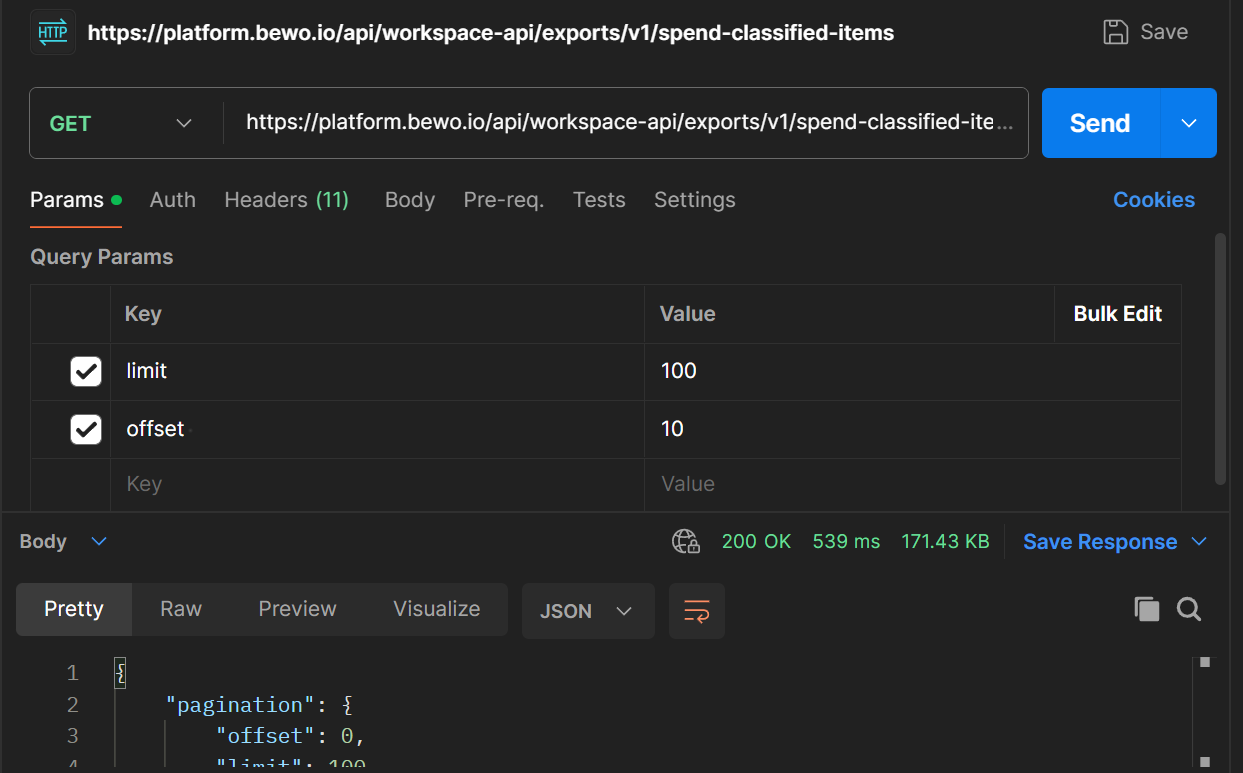
Step 4. The request was generated and you can add the query parameters before making the API call:
Endpoint response types
Unauthorized Response
- Code:
401 Unauthorized
If the workspace api key is either wrong or missing from the request, the server will respond with a 401 Unauthorized status code. In order to get the right authorization token please follow the steps mentioned in the Authorization section.
Success Response
On a successful request, the server will respond with a 200 OK status code and a JSON object containing the requested data.
- Code:
200 OK
The response body will be a JSON object containing two fields:
Paginationwhich consists of the details regarding the pagination of the responseDatawhich holds an array of classified items
JSON response example:
{
  "pagination": {
    "offset": 0,
    "limit": 0,
    "nextRowId": "3fa85f64-5717-4562-b3fc-2c963f66afa6"
  },
  "items": [
    {
      "rowId": "3fa85f64-5717-4562-b3fc-2c963f66afa6",
      "integrationVendorNumber": "string",
      "vendorName": "string",
      "itemNumber": "string",
      "erpSystemId": "string",
      "label": "string",
      "amount": 0,
      "amountUnit": "string",
      "price": 0,
      "priceUnit": "string",
      "quantity": 0,
      "quantityUnit": "string",
      "pricePerQuantity": 0,
      "postingDate": "2025-11-25",
      "accountNumbers": ["string"],
      "entryNumbers": ["string"],
      "voucherNumber": "string",
      "organizationName": "string",
      "facilityName": "string",
      "documentName": "string",
      "fileType": "string",
      "transactionContextType": "string",
      "creationTime": "2025-11-25T12:32:46.380Z",
      "lastModificationTime": "2025-11-25T12:32:46.380Z",
      "spendClassificationTree": {
        "spendClassificationPath": "string",
        "l1_Category": "string",
        "l2_Category": "string",
        "l3_Category": "string",
        "l4_Category": "string",
        "l5_Category": "string",
        "l6_Category": "string",
        "l7_Category": "string",
        "l8_Category": "string",
        "customTags": ["string"]
      },
      "identificationDetails": {
        "brand": "string",
        "model": "string",
        "productName": "string",
        "sku": "string"
      },
      "qualitativeProperties": {
        "color": "string",
        "features": "string",
        "gradeOrClass": "string",
        "material": "string",
        "origin": "string"
      },
      "quantitativeProperties": {
        "itemDimension": {
          "height": "string",
          "width": "string",
          "length": "string",
          "unit": "string"
        },
        "itemVolume": {
          "unit": "string",
          "value": "string"
        },
        "itemWeight": {
          "unit": "string",
          "value": "string"
        }
      },
      "co2Details": {
        "kgCo2Value": 0,
        "calculationNotice": "string",
        "conversionFactor": 0,
        "conversionClassName": "string",
        "estimationApproach": "string",
        "baseCo2ConversionUnit": "string",
        "scopeCategory": "string",
        "authorityName": "string"
      },
      "dimensions": [
        {
          "name": "string",
          "value": "string",
          "dimValueCode": "string"
        }
      ]
    }
  ]
}
JSON response schema model:
{
  "title": "API Export Data",
  "description": "The data export schema response.",
  "type": "object",
  "properties": {
    "pagination": {
      "type": "object",
      "properties": {
        "offset": {
          "type": "integer",
          "description": "The starting index from which to return items."
        },
        "limit": {
          "type": "integer",
          "description": "The maximum number of items to return in the response."
        },
        "nextRowId": {
          "type": ["string", "null"],
          "description": "The id of the next row for cursor pagination."
        }
      }
    },
    "items": {
      "type": "array",
      "description": "A list of exported items with their detailed attributes.",
      "items": {
        "type": "object",
        "properties": {
          "rowId": {
            "type": "string",
            "format": "uuid",
            "description": "Unique identifier for the data row."
          },
          "integrationVendorNumber": {
            "type": ["string", "null"],
            "description": "Vendor number used by the integration system."
          },
          "vendorName": {
            "type": ["string", "null"],
            "description": "The name of the vendor."
          },
          "itemNumber": {
            "type": ["string", "null"],
            "description": "The specific item number from the vendor."
          },
          "erpSystemId": {
            "type": ["string", "null"],
            "description": "Identifier for the source ERP system."
          },
          "label": {
            "type": ["string", "null"],
            "description": "The display name or label for the item."
          },
          "amount": {
            "type": "number",
            "description": "The total amount associated with the item."
          },
          "amountUnit": {
            "type": ["string", "null"],
            "description": "The unit of measurement for the amount."
          },
          "price": {
            "type": "number",
            "description": "The price of the item."
          },
          "priceUnit": {
            "type": ["string", "null"],
            "description": "The currency or unit of the price."
          },
          "quantity": {
            "type": "number",
            "description": "The number of units."
          },
          "quantityUnit": {
            "type": ["string", "null"],
            "description": "The unit for the quantity."
          },
          "pricePerQuantity": {
            "type": ["number", "null"],
            "description": "The calculated price per single unit of quantity."
          },
          "postingDate": {
            "type": ["string", "null"],
            "format": "date",
            "description": "The date the transaction was posted."
          },
          "accountNumbers": {
            "type": "array",
            "items": { "type": "string" },
            "description": "Associated account numbers."
          },
          "entryNumbers": {
            "type": "array",
            "items": { "type": "string" },
            "description": "Associated ERP system entry numbers."
          },
          "voucherNumber": {
            "type": ["string", "null"],
            "description": "The voucher number for the transaction."
          },
          "organizationName": {
            "type": ["string", "null"],
            "description": "Name of the organization making the purchase."
          },
          "facilityName": {
            "type": ["string", "null"],
            "description": "Name of the facility involved."
          },
          "documentName": {
            "type": ["string", "null"],
            "description": "The name of the source document."
          },
          "fileType": {
            "type": ["string", "null"],
            "description": "The file type of the source document."
          },
          "transactionContextType": {
            "type": ["string", "null"]
          },
          "creationTime": {
            "type": "string",
            "format": "date-time",
            "description": "Timestamp indicating when the item was created."
          },
          "lastModificationTime": {
            "type": "string",
            "format": "date-time",
            "description": "Timestamp indicating the last time the item was modified."
          },
          "spendClassificationTree": {
            "type": "object",
            "properties": {
              "spendClassificationPath": { "type": ["string", "null"] },
              "l1_Category": { "type": ["string", "null"] },
              "l2_Category": { "type": ["string", "null"] },
              "l3_Category": { "type": ["string", "null"] },
              "l4_Category": { "type": ["string", "null"] },
              "l5_Category": { "type": ["string", "null"] },
              "l6_Category": { "type": ["string", "null"] },
              "l7_Category": { "type": ["string", "null"] },
              "l8_Category": { "type": ["string", "null"] },
              "customTags": {
                "type": "array",
                "items": { "type": "string" }
              }
            }
          },
          "identificationDetails": {
            "type": "object",
            "properties": {
              "brand": { "type": ["string", "null"] },
              "model": { "type": ["string", "null"] },
              "productName": { "type": ["string", "null"] },
              "sku": { "type": ["string", "null"] }
            }
          },
          "qualitativeProperties": {
            "type": "object",
            "properties": {
              "color": { "type": ["string", "null"] },
              "features": { "type": ["string", "null"] },
              "gradeOrClass": { "type": ["string", "null"] },
              "material": { "type": ["string", "null"] },
              "origin": { "type": ["string", "null"] }
            }
          },
          "quantitativeProperties": {
            "type": "object",
            "properties": {
              "itemDimension": {
                "type": "object",
                "properties": {
                  "height": { "type": ["string", "null"] },
                  "width": { "type": ["string", "null"] },
                  "length": { "type": ["string", "null"] },
                  "unit": { "type": ["string", "null"] }
                }
              },
              "itemVolume": {
                "type": "object",
                "properties": {
                  "unit": { "type": ["string", "null"] },
                  "value": { "type": ["string", "null"] }
                }
              },
              "itemWeight": {
                "type": "object",
                "properties": {
                  "unit": { "type": ["string", "null"] },
                  "value": { "type": ["string", "null"] }
                }
              }
            }
          },
          "co2Details": {
            "type": "object",
            "properties": {
              "kgCo2Value": {
                "type": "number",
                "description": "The carbon footprint of this item measured in kilograms of CO2."
              },
              "calculationNotice": { "type": ["string", "null"] },
              "conversionFactor": { "type": ["number", "null"] },
              "conversionClassName": { "type": ["string", "null"] },
              "estimationApproach": { "type": ["string", "null"] },
              "baseCo2ConversionUnit": { "type": ["string", "null"] },
              "scopeCategory": { "type": ["string", "null"] },
              "authorityName": { "type": ["string", "null"] }
            }
          },
          "dimensions": {
            "type": "array",
            "description": "A list of dimensions associated with the item.",
            "items": {
              "type": "object",
              "properties": {
                "name": {
                  "type": ["string", "null"],
                  "description": "The name of the custom dimension."
                },
                "value": {
                  "type": ["string", "null"],
                  "description": "The value of the custom dimension."
                },
                "dimValueCode": {
                  "type": ["string", "null"],
                  "description": "The dimension value code."
                }
              }
            }
          }
        }
      }
    }
  }
}